> ## Documentation Index
> Fetch the complete documentation index at: https://docs.gourmand.dev/llms.txt
> Use this file to discover all available pages before exploring further.
# Gobi CLI (cn) Overview
> Command-line interface for automated coding tasks, scripting, and headless development workflows with Gobi's AI coding capabilities
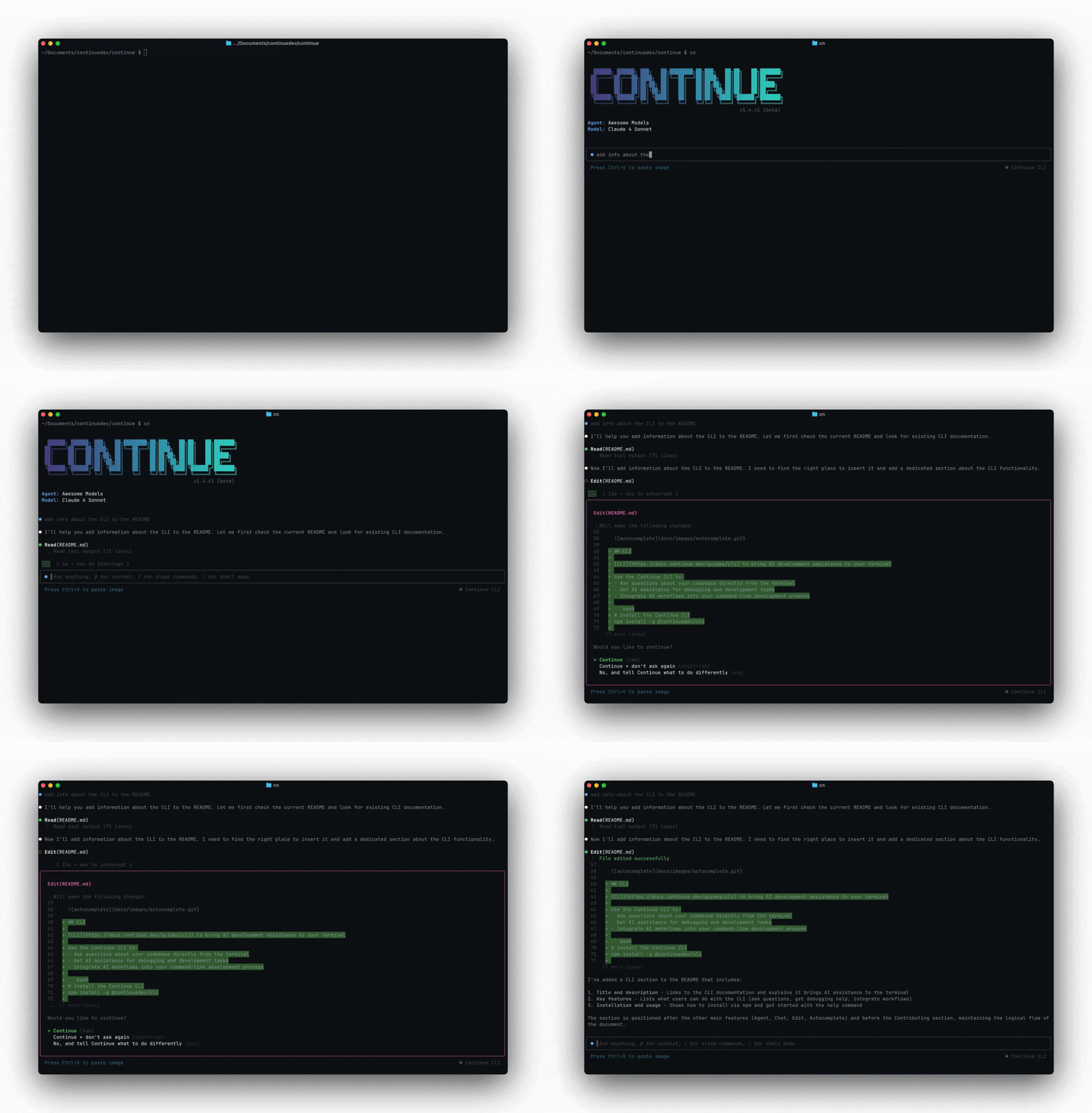 **Gobi enables developers to ship faster with Continuous AI.**
Build features from descriptions. Debug and fix issues. Navigate any codebase.
Automate tedious tasks.
## Get started in 30 seconds
Prerequisites:
* [Node.js 18 or newer](https://nodejs.org/en/download/)
* A [Gobi Hub](https://hub.gourmand.dev) account (recommended) or local configuration
```bash npm theme={null}
# Install Gobi CLI
npm install -g @gourmanddev/cli
# Navigate to your project
cd your-awesome-project
# Start coding with Gobi
cn
# You'll be prompted to set up on first use
```
That's it! You're ready to start automating with Gobi CLI.
[Gobi with CLI Quickstart →](/cli/quick-start)
## Two Ways to Use Gobi CLI
Gobi CLI offers two distinct modes designed for different workflows:
### TUI Mode: Interactive Development
**Perfect for exploration, debugging, and iterating on AI workflows**
```bash theme={null}
cn
> @src/components/UserProfile.js Review this component for security issues
> Generate comprehensive unit tests
> Suggest performance improvements
```
* **Interactive conversations** with your codebase
* **Iterate and refine** prompts and approaches
* **Explore and understand** complex codebases
* **Perfect for experimentation** and learning
### Headless Mode: Production Automation
**Perfect for CI/CD, automation, and reliable workflows**
```bash theme={null}
cn -p "Generate a conventional commit message for staged changes"
cn -p "Review pull request changes for security vulnerabilities"
cn -p "Update documentation based on recent code changes"
```
* **Single-command execution** for automation
* **Reliable, repeatable results** for production use
* **CI/CD and pipeline integration**
* **Git hooks and automated workflows**
### Development Workflow: TUI → Headless
**Pro Tip**: Start in TUI mode to iterate on your AI agent. Once
you have a workflow that works reliably, deploy it as a Continuous AI
automation.
1. **Experiment in TUI mode** to perfect your agent
2. **Test different approaches** interactively until you get consistent results
3. **Convert successful workflows** to automated Continuous AI commands
4. **Deploy in production** with confidence in your proven approach
## Why developers love Gobi CLI
* **Works in your terminal**: Not another chat window. Not another IDE. Gobi CLI meets you where you already work, with the tools you already love.
* **Takes action**: Gobi CLI can directly edit files, run commands, and create commits. Need more? Check out our [MCPs](/customize/deep-dives/mcp).
* **Automate tasks**: Create issues from PostHog data, automatically assign labels to issues, and more. Do all this in a single command from your developer machines, or automatically in CI.
* **Flexible development flow**: Start interactive, then automate proven workflows.
## Key Capabilities
### Context Engineering
* Use `@` to reference files and provide context
* Use `/` to run slash commands for specific tasks
* Access the same context providers as IDE extensions
### Tool Integration
* File editing and creation
* Terminal command execution
* Codebase understanding and analysis
* Git integration
* Web search and documentation access
### Model Flexibility
* Switch between models with `/model` command
* Use any model configured in your `config.yaml`
* Access Gobi Hub models and configurations
## Gobi Hub Integration
Gobi CLI integrates seamlessly with [Gobi Hub](https://hub.gourmand.dev) for:
### API Access
Get an API key for automation workflows:
1. Visit [Gobi Hub API Keys](https://hub.gourmand.dev/settings/api-keys)
2. Create a new API key
3. Use with `cn login` or in your automation scripts
### Secrets Management
Store secure credentials for CLI workflows:
1. Visit [Gobi Hub Secrets](https://hub.gourmand.dev/settings/secrets)
2. Add your API keys and sensitive data
3. Reference in configurations with `${{ secrets.SECRET_NAME }}`
### Configuration Sync
* Cloud-managed configurations automatically sync
* Share configurations across team members
* Version control for your AI workflows
## Common Use Cases
### TUI Mode Examples
**Interactive development and exploration:**
```bash Codebase Exploration theme={null}
# Start interactive session
cn
> @src/components Find all unused React components
> /explain How does authentication work in this codebase?
> @auth/ What security patterns are used here?
```
```bash Iterative Debugging theme={null}
# Debug issues interactively
cn
> @tests/auth.test.js This test is failing, help me understand why
> @src/auth/middleware.js Let's examine this middleware
> /debug What could be causing the timeout error?
```
```bash Workflow Development theme={null}
# Develop and test automation workflows
cn
> @package.json @CHANGELOG.md Generate a release notes template
> # Test and refine the approach
> # Once working, convert to: cn -p "Generate release notes"
```
### Headless Mode Examples
**Production automation and scripting:**
```bash Git Automation theme={null}
# Generate commit messages
cn -p "Generate a conventional commit message for the current changes"
# Code review automation
cn -p "Review the current git changes for bugs and suggest improvements"
```
```bash CI/CD Integration theme={null}
# In your pipeline scripts
cn -p "Analyze test failures and suggest fixes"
# Automated documentation updates
cn -p "@README.md Update this documentation based on recent changes"
```
```bash Issue Management theme={null}
# Create GitHub issues from PostHog data
cn -p "@posthog-data.json Create GitHub issues for UX problems found in this session data"
# Automated security audits
cn -p "Scan the codebase for potential security vulnerabilities"
```
## Next steps
Learn basic commands and common workflows
Install Gobi CLI and set up your environment
Task-specific tutorials and examples
**Gobi enables developers to ship faster with Continuous AI.**
Build features from descriptions. Debug and fix issues. Navigate any codebase.
Automate tedious tasks.
## Get started in 30 seconds
Prerequisites:
* [Node.js 18 or newer](https://nodejs.org/en/download/)
* A [Gobi Hub](https://hub.gourmand.dev) account (recommended) or local configuration
```bash npm theme={null}
# Install Gobi CLI
npm install -g @gourmanddev/cli
# Navigate to your project
cd your-awesome-project
# Start coding with Gobi
cn
# You'll be prompted to set up on first use
```
That's it! You're ready to start automating with Gobi CLI.
[Gobi with CLI Quickstart →](/cli/quick-start)
## Two Ways to Use Gobi CLI
Gobi CLI offers two distinct modes designed for different workflows:
### TUI Mode: Interactive Development
**Perfect for exploration, debugging, and iterating on AI workflows**
```bash theme={null}
cn
> @src/components/UserProfile.js Review this component for security issues
> Generate comprehensive unit tests
> Suggest performance improvements
```
* **Interactive conversations** with your codebase
* **Iterate and refine** prompts and approaches
* **Explore and understand** complex codebases
* **Perfect for experimentation** and learning
### Headless Mode: Production Automation
**Perfect for CI/CD, automation, and reliable workflows**
```bash theme={null}
cn -p "Generate a conventional commit message for staged changes"
cn -p "Review pull request changes for security vulnerabilities"
cn -p "Update documentation based on recent code changes"
```
* **Single-command execution** for automation
* **Reliable, repeatable results** for production use
* **CI/CD and pipeline integration**
* **Git hooks and automated workflows**
### Development Workflow: TUI → Headless
**Pro Tip**: Start in TUI mode to iterate on your AI agent. Once
you have a workflow that works reliably, deploy it as a Continuous AI
automation.
1. **Experiment in TUI mode** to perfect your agent
2. **Test different approaches** interactively until you get consistent results
3. **Convert successful workflows** to automated Continuous AI commands
4. **Deploy in production** with confidence in your proven approach
## Why developers love Gobi CLI
* **Works in your terminal**: Not another chat window. Not another IDE. Gobi CLI meets you where you already work, with the tools you already love.
* **Takes action**: Gobi CLI can directly edit files, run commands, and create commits. Need more? Check out our [MCPs](/customize/deep-dives/mcp).
* **Automate tasks**: Create issues from PostHog data, automatically assign labels to issues, and more. Do all this in a single command from your developer machines, or automatically in CI.
* **Flexible development flow**: Start interactive, then automate proven workflows.
## Key Capabilities
### Context Engineering
* Use `@` to reference files and provide context
* Use `/` to run slash commands for specific tasks
* Access the same context providers as IDE extensions
### Tool Integration
* File editing and creation
* Terminal command execution
* Codebase understanding and analysis
* Git integration
* Web search and documentation access
### Model Flexibility
* Switch between models with `/model` command
* Use any model configured in your `config.yaml`
* Access Gobi Hub models and configurations
## Gobi Hub Integration
Gobi CLI integrates seamlessly with [Gobi Hub](https://hub.gourmand.dev) for:
### API Access
Get an API key for automation workflows:
1. Visit [Gobi Hub API Keys](https://hub.gourmand.dev/settings/api-keys)
2. Create a new API key
3. Use with `cn login` or in your automation scripts
### Secrets Management
Store secure credentials for CLI workflows:
1. Visit [Gobi Hub Secrets](https://hub.gourmand.dev/settings/secrets)
2. Add your API keys and sensitive data
3. Reference in configurations with `${{ secrets.SECRET_NAME }}`
### Configuration Sync
* Cloud-managed configurations automatically sync
* Share configurations across team members
* Version control for your AI workflows
## Common Use Cases
### TUI Mode Examples
**Interactive development and exploration:**
```bash Codebase Exploration theme={null}
# Start interactive session
cn
> @src/components Find all unused React components
> /explain How does authentication work in this codebase?
> @auth/ What security patterns are used here?
```
```bash Iterative Debugging theme={null}
# Debug issues interactively
cn
> @tests/auth.test.js This test is failing, help me understand why
> @src/auth/middleware.js Let's examine this middleware
> /debug What could be causing the timeout error?
```
```bash Workflow Development theme={null}
# Develop and test automation workflows
cn
> @package.json @CHANGELOG.md Generate a release notes template
> # Test and refine the approach
> # Once working, convert to: cn -p "Generate release notes"
```
### Headless Mode Examples
**Production automation and scripting:**
```bash Git Automation theme={null}
# Generate commit messages
cn -p "Generate a conventional commit message for the current changes"
# Code review automation
cn -p "Review the current git changes for bugs and suggest improvements"
```
```bash CI/CD Integration theme={null}
# In your pipeline scripts
cn -p "Analyze test failures and suggest fixes"
# Automated documentation updates
cn -p "@README.md Update this documentation based on recent changes"
```
```bash Issue Management theme={null}
# Create GitHub issues from PostHog data
cn -p "@posthog-data.json Create GitHub issues for UX problems found in this session data"
# Automated security audits
cn -p "Scan the codebase for potential security vulnerabilities"
```
## Next steps
Learn basic commands and common workflows
Install Gobi CLI and set up your environment
Task-specific tutorials and examples