> ## Documentation Index
> Fetch the complete documentation index at: https://docs.gourmand.dev/llms.txt
> Use this file to discover all available pages before exploring further.
# Context Providers
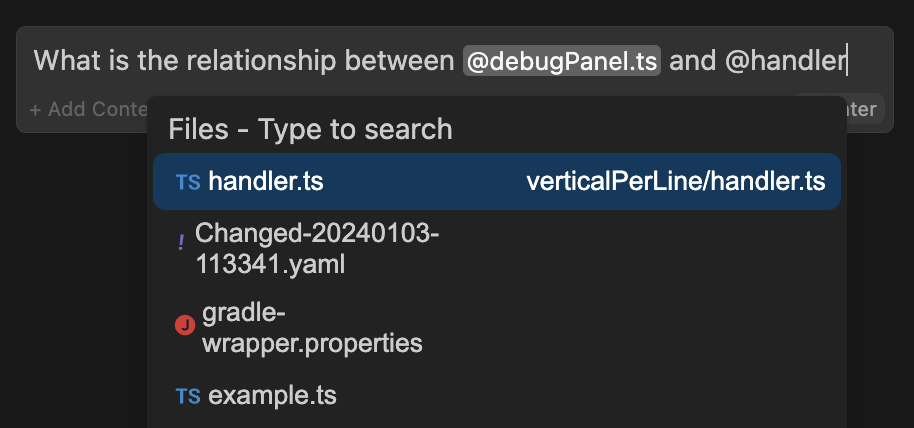
> Context Providers allow you to type '@' and see a dropdown of content that can all be provided to the model as context.
Context Providers allow you to type '@' and see a dropdown of content that can all be provided to the model as context.
 ## Built-in Context Providers
You can add any built-in context-providers in your config file as shown below:
### `@File`
Reference any file in your current workspace.
```yaml config.yaml theme={null}
context:
- provider: file
```
### `@Code`
Reference specific functions or classes from throughout your project.
```yaml config.yaml theme={null}
context:
- provider: code
```
### `@Git Diff`
Reference all of the changes you've made to your current branch. This is useful if you want to summarize what you've done or ask for a general review of your work before committing.
```yaml config.yaml theme={null}
context:
- provider: diff
```
### `@Current File`
Reference the currently open file.
```yaml config.yaml theme={null}
context:
- provider: currentFile
```
### `@Terminal`
Reference the last command you ran in your IDE's terminal and its output.
```yaml config.yaml theme={null}
context:
- provider: terminal
```
### `@Open`
Reference the contents of all of your open files. Set `onlyPinned` to `true` to only reference pinned files.
```yaml config.yaml theme={null}
context:
- provider: open
params:
onlyPinned: true
```
### `@Clipboard`
Reference recent clipboard items
```yaml config.yaml theme={null}
context:
- provider: clipboard
```
### `@Tree`
Reference the structure of your current workspace.
```yaml config.yaml theme={null}
context:
- provider: tree
```
### `@Problems`
Get Problems from the current file.
```yaml config.yaml theme={null}
context:
- provider: problems
```
### `@Debugger`
Reference the contents of the local variables in the debugger. Currently only available in VS Code.
```yaml config.yaml theme={null}
context:
- provider: debugger
params:
stackDepth: 3
```
Uses the top *n* levels (defaulting to 3) of the call stack for that thread.
### `@Repository Map`
Reference the outline of your codebase. By default, signatures are included along with file in the repo map.
`includeSignatures` params can be set to false to exclude signatures. This could be necessary for large codebases and/or to reduce context size significantly. Signatures will not be included if indexing is disabled.
```yaml config.yaml theme={null}
context:
- provider: repo-map
params:
includeSignatures: false # default true
```
Provides a list of files and the call signatures of top-level classes, functions, and methods in those files. This helps the model better understand how a particular piece of code relates to the rest of the codebase.
In the submenu that appears, you can select either `Entire codebase`, or specify a subfolder to generate the repostiory map from.
This context provider is inpsired by [Aider's repository map](https://aider.chat/2023/10/22/repomap.html).
### `@Operating System`
Reference the architecture and platform of your current operating system.
```yaml config.yaml theme={null}
context:
- provider: os
```
### `@HTTP`
The HttpContextProvider makes a POST request to the url passed in the configuration. The server must return 200 OK with a ContextItem object or an array of ContextItems.
```yaml config.yaml theme={null}
context:
- provider: http
params:
url: "https://api.example.com/v1/users"
headers:
- Authorization: "Bearer "
```
The receiving URL should expect to receive the following parameters:
POST parameters
```json theme={null}
{ query: string, fullInput: string}
```
The response 200 OK should be a JSON object with the following structure:
Response
```
[ { "name": "", "description": "", "content": "" }]// OR{ "name": "", "description": "", "content": ""}
```
### Model Context Protocol
The [Model Context Protocol](https://modelcontextprotocol.io/introduction) is a standard proposed by Anthropic to unify prompts, context, and tool use. Gobi supports any MCP server with the MCP context provider. Read their [quickstart](https://modelcontextprotocol.io/quickstart) to learn how to set up a local server and then set up your configuration like this:
```yaml config.yaml theme={null}
mcpServers:
- name: My MCP Server
command: uvx
args:
- mcp-server-sqlite
- --db-path
- /Users/NAME/test.db
```
You'll then be able to type "@" and see "MCP" in the context providers dropdown.
## Deprecated Context Providers
To provide conext beyond the built-in context providers, we now recommend
using [MCP Servers](/customization/mcp-tools)
View the [deprecated context providers](/reference/deprecated-context-providers) for documentation on:
* [`@Codebase`](/reference/deprecated-codebase) - Use the [codebase awareness guide](/guides/codebase-documentation-awareness) instead
* [`@Folder`](/reference/deprecated-codebase) - Use the [codebase awareness guide](/guides/codebase-documentation-awareness) instead
* [`@Docs`](/reference/deprecated-docs) - Use the [documentation awareness guide](/guides/codebase-documentation-awareness) instead
* `@Greptile` - Query Greptile index
* `@Commits` - Reference git commits
* `@Discord` - Reference Discord messages
* `@Jira` - Reference Jira issues
* `@Gitlab Merge Request` - Reference GitLab MRs
* `@Google` - Google search results
* `@Database` - Database schemas
* `@Issue` - GitHub issues
* `@Url` - URL content
* `@Search` - Codebase search
* `@Web` - Web search results
## Built-in Context Providers
You can add any built-in context-providers in your config file as shown below:
### `@File`
Reference any file in your current workspace.
```yaml config.yaml theme={null}
context:
- provider: file
```
### `@Code`
Reference specific functions or classes from throughout your project.
```yaml config.yaml theme={null}
context:
- provider: code
```
### `@Git Diff`
Reference all of the changes you've made to your current branch. This is useful if you want to summarize what you've done or ask for a general review of your work before committing.
```yaml config.yaml theme={null}
context:
- provider: diff
```
### `@Current File`
Reference the currently open file.
```yaml config.yaml theme={null}
context:
- provider: currentFile
```
### `@Terminal`
Reference the last command you ran in your IDE's terminal and its output.
```yaml config.yaml theme={null}
context:
- provider: terminal
```
### `@Open`
Reference the contents of all of your open files. Set `onlyPinned` to `true` to only reference pinned files.
```yaml config.yaml theme={null}
context:
- provider: open
params:
onlyPinned: true
```
### `@Clipboard`
Reference recent clipboard items
```yaml config.yaml theme={null}
context:
- provider: clipboard
```
### `@Tree`
Reference the structure of your current workspace.
```yaml config.yaml theme={null}
context:
- provider: tree
```
### `@Problems`
Get Problems from the current file.
```yaml config.yaml theme={null}
context:
- provider: problems
```
### `@Debugger`
Reference the contents of the local variables in the debugger. Currently only available in VS Code.
```yaml config.yaml theme={null}
context:
- provider: debugger
params:
stackDepth: 3
```
Uses the top *n* levels (defaulting to 3) of the call stack for that thread.
### `@Repository Map`
Reference the outline of your codebase. By default, signatures are included along with file in the repo map.
`includeSignatures` params can be set to false to exclude signatures. This could be necessary for large codebases and/or to reduce context size significantly. Signatures will not be included if indexing is disabled.
```yaml config.yaml theme={null}
context:
- provider: repo-map
params:
includeSignatures: false # default true
```
Provides a list of files and the call signatures of top-level classes, functions, and methods in those files. This helps the model better understand how a particular piece of code relates to the rest of the codebase.
In the submenu that appears, you can select either `Entire codebase`, or specify a subfolder to generate the repostiory map from.
This context provider is inpsired by [Aider's repository map](https://aider.chat/2023/10/22/repomap.html).
### `@Operating System`
Reference the architecture and platform of your current operating system.
```yaml config.yaml theme={null}
context:
- provider: os
```
### `@HTTP`
The HttpContextProvider makes a POST request to the url passed in the configuration. The server must return 200 OK with a ContextItem object or an array of ContextItems.
```yaml config.yaml theme={null}
context:
- provider: http
params:
url: "https://api.example.com/v1/users"
headers:
- Authorization: "Bearer "
```
The receiving URL should expect to receive the following parameters:
POST parameters
```json theme={null}
{ query: string, fullInput: string}
```
The response 200 OK should be a JSON object with the following structure:
Response
```
[ { "name": "", "description": "", "content": "" }]// OR{ "name": "", "description": "", "content": ""}
```
### Model Context Protocol
The [Model Context Protocol](https://modelcontextprotocol.io/introduction) is a standard proposed by Anthropic to unify prompts, context, and tool use. Gobi supports any MCP server with the MCP context provider. Read their [quickstart](https://modelcontextprotocol.io/quickstart) to learn how to set up a local server and then set up your configuration like this:
```yaml config.yaml theme={null}
mcpServers:
- name: My MCP Server
command: uvx
args:
- mcp-server-sqlite
- --db-path
- /Users/NAME/test.db
```
You'll then be able to type "@" and see "MCP" in the context providers dropdown.
## Deprecated Context Providers
To provide conext beyond the built-in context providers, we now recommend
using [MCP Servers](/customization/mcp-tools)
View the [deprecated context providers](/reference/deprecated-context-providers) for documentation on:
* [`@Codebase`](/reference/deprecated-codebase) - Use the [codebase awareness guide](/guides/codebase-documentation-awareness) instead
* [`@Folder`](/reference/deprecated-codebase) - Use the [codebase awareness guide](/guides/codebase-documentation-awareness) instead
* [`@Docs`](/reference/deprecated-docs) - Use the [documentation awareness guide](/guides/codebase-documentation-awareness) instead
* `@Greptile` - Query Greptile index
* `@Commits` - Reference git commits
* `@Discord` - Reference Discord messages
* `@Jira` - Reference Jira issues
* `@Gitlab Merge Request` - Reference GitLab MRs
* `@Google` - Google search results
* `@Database` - Database schemas
* `@Issue` - GitHub issues
* `@Url` - URL content
* `@Search` - Codebase search
* `@Web` - Web search results