> ## Documentation Index
> Fetch the complete documentation index at: https://docs.gourmand.dev/llms.txt
> Use this file to discover all available pages before exploring further.
# Intro to Roles
> Apply model role
Models in Gobi can be configured to be used for various roles in the extension.
* [`chat`](./chat.mdx): Used for chat conversations in the extension sidebar
* [`autocomplete`](./autocomplete): Used for autocomplete code suggestions in the editor
* [`edit`](./edit.mdx): Used to generate code based on edit prompts
* [`apply`](./apply.mdx): Used to decide how to apply edits to a file
* [`embed`](./embeddings.mdx): Used to generate embeddings used for vector search (@Codebase and @Docs context providers)
* [`rerank`](./reranking.mdx): Used to rerank results from vector search
These roles can be specified for a `config.yaml` model block using `roles`. See the [YAML Specification](/reference#models) for more details.
For recommendations on which models work best for each role, see our [comprehensive model recommendations](/customization/models#recommended-models).
## Selecting model roles
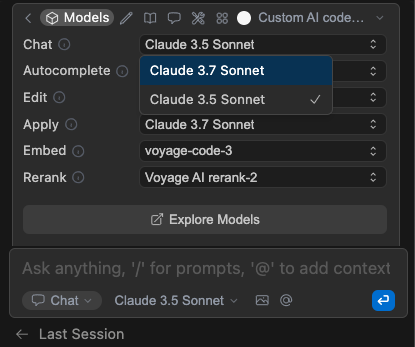
You can control which of the models in your config for a given role will be currently used for that role. Above the main input, click the 3 dots and then the cube icon to expand the `Models` section. Then you can use the dropdowns to select an active model for each role.
 `roles` are not explicitly defined within `config.json` (deprecated) - they
are infered by the top level keys like `embeddingsProvider`
`roles` are not explicitly defined within `config.json` (deprecated) - they
are infered by the top level keys like `embeddingsProvider`