> ## Documentation Index
> Fetch the complete documentation index at: https://docs.gourmand.dev/llms.txt
> Use this file to discover all available pages before exploring further.
# Source Control
> When managing your custom configurations within an organization, you might want to take advantage of your usual source control workflows. Gobi makes this easy with a GitHub Action that automatically syncs your YAML files with hub.gourmand.dev. We are also planning on adding automations for GitLab, BitBucket, Gitee, and others. If you are interested, please reach out to us on .
## Quickstart
This quickstart uses a template repository, but you can also follow these steps 2-4 from an existing repository.
### 1. Create a new repository from the template
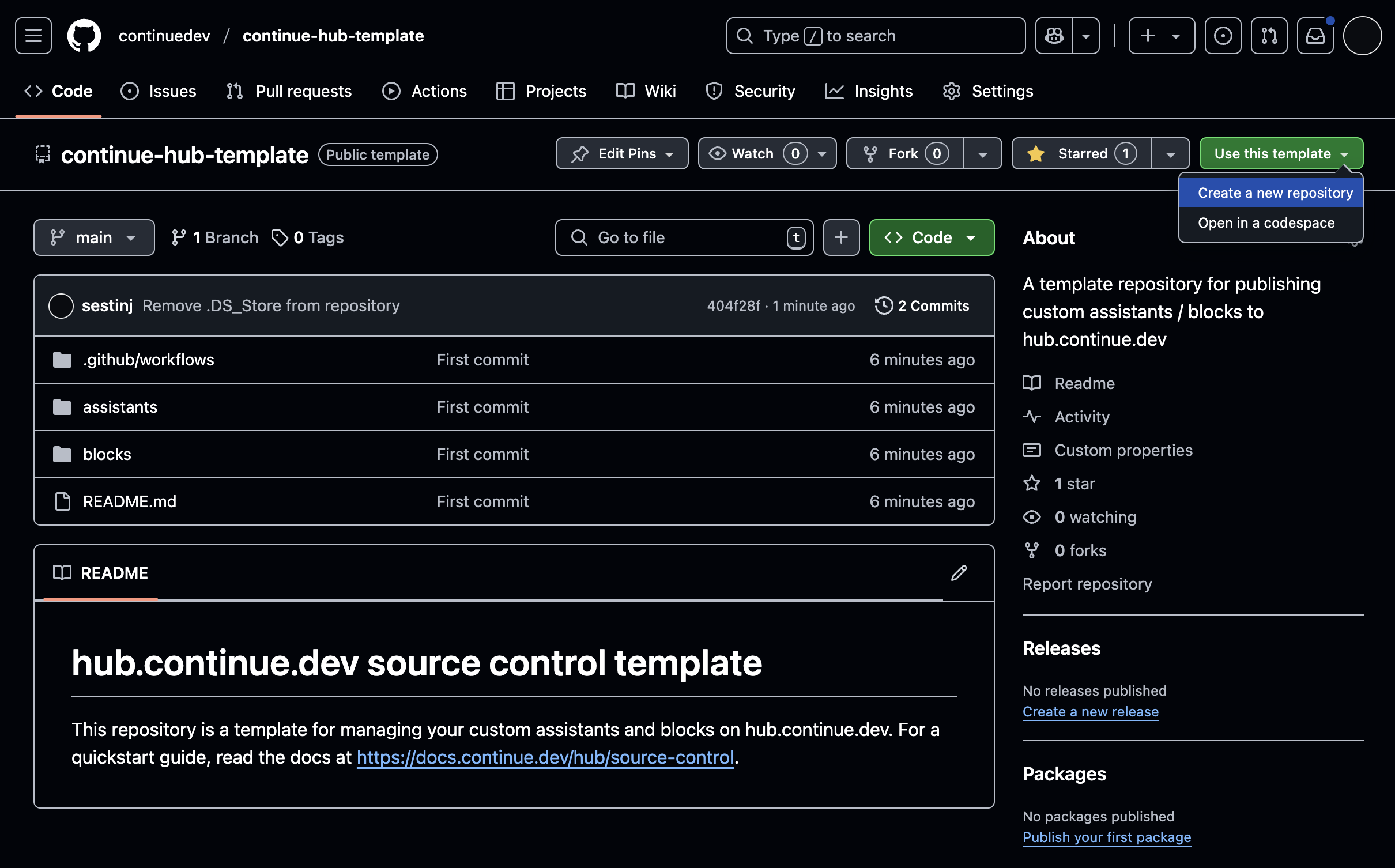
As shown in the image below, start by creating a new repository from [the template](https://github.com/gourmand/gobi-hub-template). Click "Use Template" and then "Create a new repository".
 ### 2. Obtain a deploy key
Deploy keys allow the GitHub Action to authenticate with hub.gourmand.dev. [Obtain your deploy key here](https://hub.gourmand.dev/settings/api-keys) and then [create a secret](https://docs.github.com/en/actions/security-for-github-actions/security-guides/using-secrets-in-github-actions#creating-secrets-for-a-repository) named `GOBI_API_KEY` in your GitHub repository.
### 3. Configure the GitHub Action
This step assumes you have already created an organization on
hub.gourmand.dev. If not, learn more [here](/hub/governance/creating-an-org).
In the repository you created, navigate to `.github/workflows/main.yaml` and update the lines below to match your organization:
```
env: OWNER_SLUG: my-org-slug # <-- TODO
```
This is the only configuration necessary, but you can view the full list of options [here](https://github.com/gourmand/gobi-publish-action/blob/main/README.md).
### 4. Commit and push
Add the [YAML for your configurations](/reference) to the appropriate directories. The name of the file will be the slug of the configuration options.
* `assistants/public` for public configurations
* `assistants/private` for private (visible only within your organization) configurations
* `blocks/public` for public configuration options
* `blocks/private` for private configuration options
Then, commit and push your changes. Once the GitHub Action has completed running, you should be able to view the configurations within your organization on hub.gourmand.dev. For subsequent changes, make sure to increment the `version` property of your updated YAML file(s).
### 2. Obtain a deploy key
Deploy keys allow the GitHub Action to authenticate with hub.gourmand.dev. [Obtain your deploy key here](https://hub.gourmand.dev/settings/api-keys) and then [create a secret](https://docs.github.com/en/actions/security-for-github-actions/security-guides/using-secrets-in-github-actions#creating-secrets-for-a-repository) named `GOBI_API_KEY` in your GitHub repository.
### 3. Configure the GitHub Action
This step assumes you have already created an organization on
hub.gourmand.dev. If not, learn more [here](/hub/governance/creating-an-org).
In the repository you created, navigate to `.github/workflows/main.yaml` and update the lines below to match your organization:
```
env: OWNER_SLUG: my-org-slug # <-- TODO
```
This is the only configuration necessary, but you can view the full list of options [here](https://github.com/gourmand/gobi-publish-action/blob/main/README.md).
### 4. Commit and push
Add the [YAML for your configurations](/reference) to the appropriate directories. The name of the file will be the slug of the configuration options.
* `assistants/public` for public configurations
* `assistants/private` for private (visible only within your organization) configurations
* `blocks/public` for public configuration options
* `blocks/private` for private configuration options
Then, commit and push your changes. Once the GitHub Action has completed running, you should be able to view the configurations within your organization on hub.gourmand.dev. For subsequent changes, make sure to increment the `version` property of your updated YAML file(s).