> ## Documentation Index
> Fetch the complete documentation index at: https://docs.gourmand.dev/llms.txt
> Use this file to discover all available pages before exploring further.
# Next Edit
> Learn how Gobi's Next Edit feature predicts and suggests your next code changes using AI, going beyond traditional autocomplete to anticipate entire code modifications
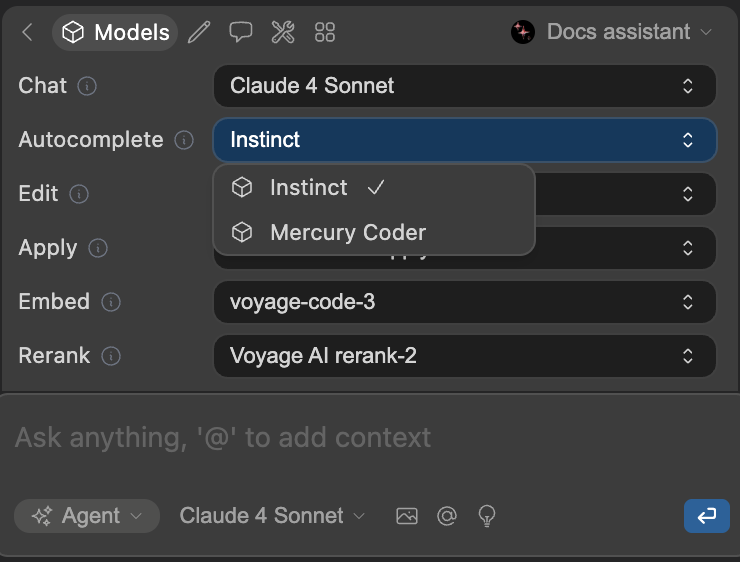
Next Edit is currently an experimental feature. It requires
[Instinct](https://hub.gourmand.dev/gobi/instinct) or [Mercury Coder
model](https://hub.gourmand.dev/inception/mercury-coder) configured in
your Gobi autocomplete settings and is not yet available for JetBrains
use.
## What is Next Edit?
Next Edit is an advanced AI-powered code prediction feature that anticipates what changes you'll make next in your code. Unlike traditional autocomplete that reacts to your typing, Next Edit proactively analyzes your recent edits and coding patterns to suggest entire code modifications before you even start typing.
Think of it as having an AI pair programmer that understands your coding flow and suggests the logical next step in your development process.
## How Next Edit Works
### The Prediction Process
1. **Context Analysis**: Captures your current cursor position and recent edit history
2. **Pattern Recognition**: Analyzes your coding patterns and the surrounding code context
3. **Next Step Prediction**: Uses specialized AI models to predict what you'll likely change next
4. **Visual Presentation**: Shows predictions as diff overlays rather than simple text completions
5. **Interactive Review**: Lets you accept (Tab) or reject (Esc) the suggested changes
6. **Jump to Next Edit Location**: Lets you jump (Tab) to the next edit location or reject (Esc)
### Intelligent Triggering
Next Edit activates automatically when:
* You finish making a code change
* The AI detects a logical continuation point
* Specialized next-edit models are available
* The current context suggests a predictable next step
## Next Edit vs Traditional Autocomplete
**Autocomplete**: Completes the current line or statement you're typing
**Next Edit**: Predicts entire code modifications across multiple lines
**Autocomplete**: Shows ghost text at your cursor position
**Next Edit**: Displays diff overlays showing before/after changes, while also displaying ghost text if the change is purely additive.
**Autocomplete**: Reactive - responds to what you're currently typing
**Next Edit**: Proactive - anticipates what you'll do next
**Autocomplete**: Focuses on immediate code completion
**Next Edit**: Analyzes recent edit patterns and broader code context
## How to Use Next Edit
### Prerequisites
Next Edit requires:
* Compatible AI models (Mercury Coder or Instinct)
* VS Code (JetBrains support coming soon)
* **API Keys**: Organizations can add API keys to [org secrets](/hub/secrets/secret-types) for team-wide access. Individual users need to provide their own API keys in their [model configuration](/customize/model-providers/overview)
To use Next Edit, you must have the Instinct or Mercury Coder model configured
in your Gobi autocomplete model settings. This model is specifically
designed for next edit predictions. Once it's been loaded, you must reload VS
Code to activate it.
 ### Using Next Edit Predictions
Edit your code normally. Next Edit will analyze your change patterns.
When Next Edit activates, you'll see a diff overlay showing predicted changes
in an editable region.
* **Tab**: Accept the prediction and apply changes - **Esc**: Reject the
prediction and gobi coding normally
If accepted, your cursor moves to the last changed line. If rejected, your
workflow gobis uninterrupted.
## What are the Model Requirements for Next Edit?
### Specialized Models
Next Edit requires AI models specifically trained for code prediction:
* **Mercury Coder**: Primary model optimized for next edit prediction
* **Instinct**: The leading open Next Edit model, trained by Gobi
### Automatic Detection
Gobi automatically enables Next Edit when:
1. Your configured autocomplete model supports next edit capabilities
2. You have development team access permissions
3. The current code context suggests predictable next steps
## Best Practices
Let Next Edit observe your coding patterns for a few editing sessions before expecting highly accurate predictions.
Always review suggested changes before accepting, especially for complex logic
modifications.
Have feedback? We want to hear it. **[Add your thoughts to our feedback
discussions](https://github.com/gourmand/gobi/discussions/categories/feedback)**
to help us improve.
Use Next Edit alongside Gobi's Chat and Agent modes for comprehensive AI-assisted development.
***
*Next Edit represents Gobi's vision for proactive AI coding assistance that anticipates developer needs rather than just reacting to input. As this feature evolves, it will become a powerful tool for accelerating development workflows and reducing repetitive coding tasks.*
### Using Next Edit Predictions
Edit your code normally. Next Edit will analyze your change patterns.
When Next Edit activates, you'll see a diff overlay showing predicted changes
in an editable region.
* **Tab**: Accept the prediction and apply changes - **Esc**: Reject the
prediction and gobi coding normally
If accepted, your cursor moves to the last changed line. If rejected, your
workflow gobis uninterrupted.
## What are the Model Requirements for Next Edit?
### Specialized Models
Next Edit requires AI models specifically trained for code prediction:
* **Mercury Coder**: Primary model optimized for next edit prediction
* **Instinct**: The leading open Next Edit model, trained by Gobi
### Automatic Detection
Gobi automatically enables Next Edit when:
1. Your configured autocomplete model supports next edit capabilities
2. You have development team access permissions
3. The current code context suggests predictable next steps
## Best Practices
Let Next Edit observe your coding patterns for a few editing sessions before expecting highly accurate predictions.
Always review suggested changes before accepting, especially for complex logic
modifications.
Have feedback? We want to hear it. **[Add your thoughts to our feedback
discussions](https://github.com/gourmand/gobi/discussions/categories/feedback)**
to help us improve.
Use Next Edit alongside Gobi's Chat and Agent modes for comprehensive AI-assisted development.
***
*Next Edit represents Gobi's vision for proactive AI coding assistance that anticipates developer needs rather than just reacting to input. As this feature evolves, it will become a powerful tool for accelerating development workflows and reducing repetitive coding tasks.*