> ## Documentation Index
> Fetch the complete documentation index at: https://docs.gourmand.dev/llms.txt
> Use this file to discover all available pages before exploring further.
# Quick Start Tutorial
> Learn Gobi's core features through hands-on exercises. Get started with Autocomplete, Edit, Chat, and Agent mode in minutes.
Welcome to Gobi! This interactive tutorial will guide you through all four core features using practical examples. Follow along step-by-step to learn more about Gobi's capabilities.
**Prerequisites**: Make sure you have [installed
Gobi](/ide-extensions/install) and [signed
in](https://auth.gourmand.dev/) to get started.
***
## 🔄 Autocomplete
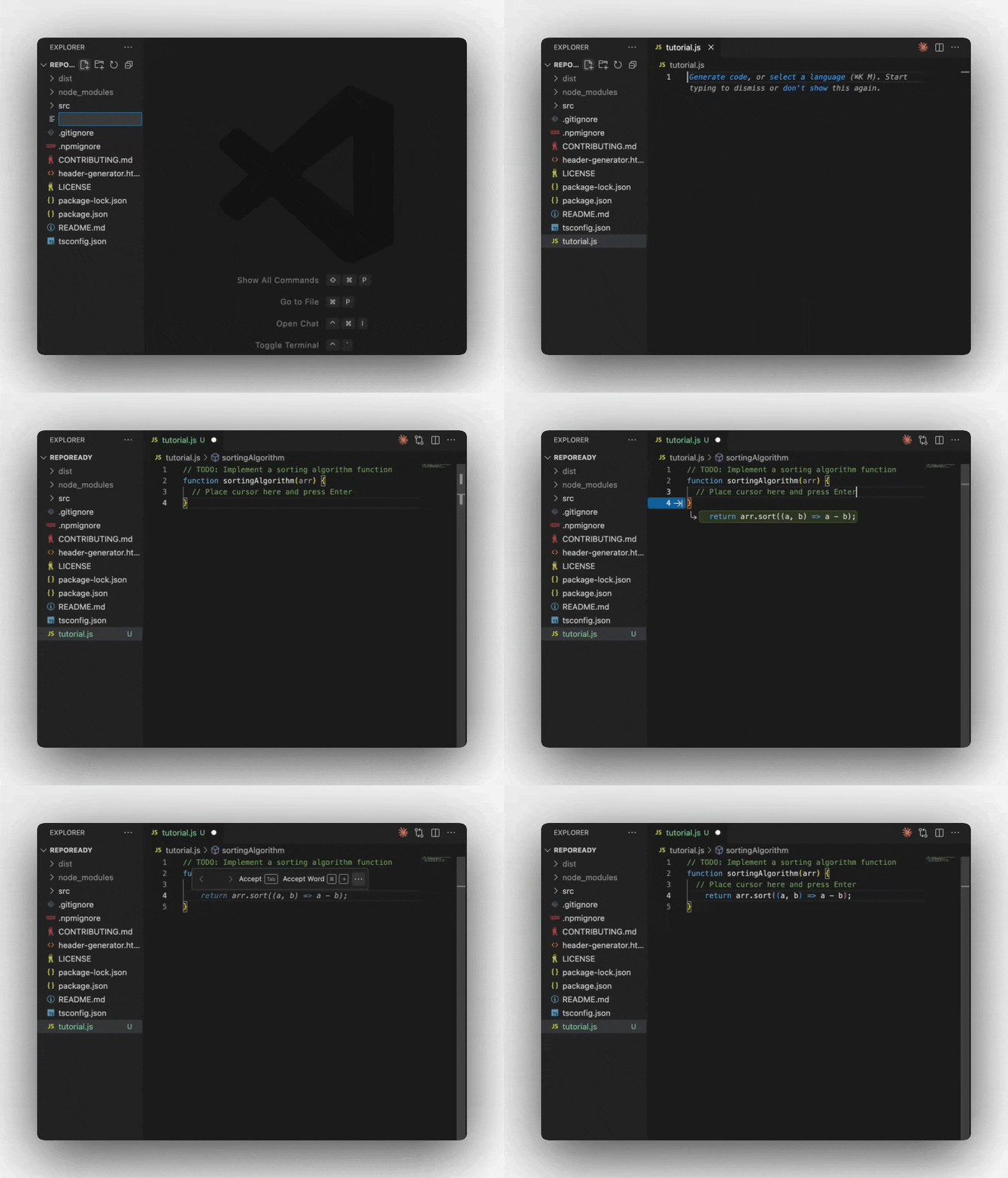
**What it does**: Provides intelligent inline code suggestions as you type, powered by AI.
Create a new file called `tutorial.js` (or use any language you prefer) in your IDE
Copy this starter code and place your cursor at the end of the comment:
```javascript theme={null}
// TODO: Implement a sorting algorithm function
function sortingAlgorithm(arr) {
// Place cursor here and press Enter
}
```
Press **Enter** and watch Gobi suggest code completions. Press **Tab** to accept suggestions.
Gobi will intelligently suggest function implementations based on the context and comment.
Autocomplete works best when you provide clear function names, comments, or
type annotations that give context about your intent.
***
 ## ✏️ Edit
**What it does**: Make quick, targeted changes to specific code sections using natural language instructions.
Paste this bubble sort implementation in your file:
```javascript theme={null}
function sortingAlgorithm(x) {
for (let i = 0; i < x.length; i++) {
for (let j = 0; j < x.length - 1; j++) {
if (x[j] > x[j + 1]) {
let temp = x[j];
x[j] = x[j + 1];
x[j + 1] = temp;
}
}
}
return x;
}
```
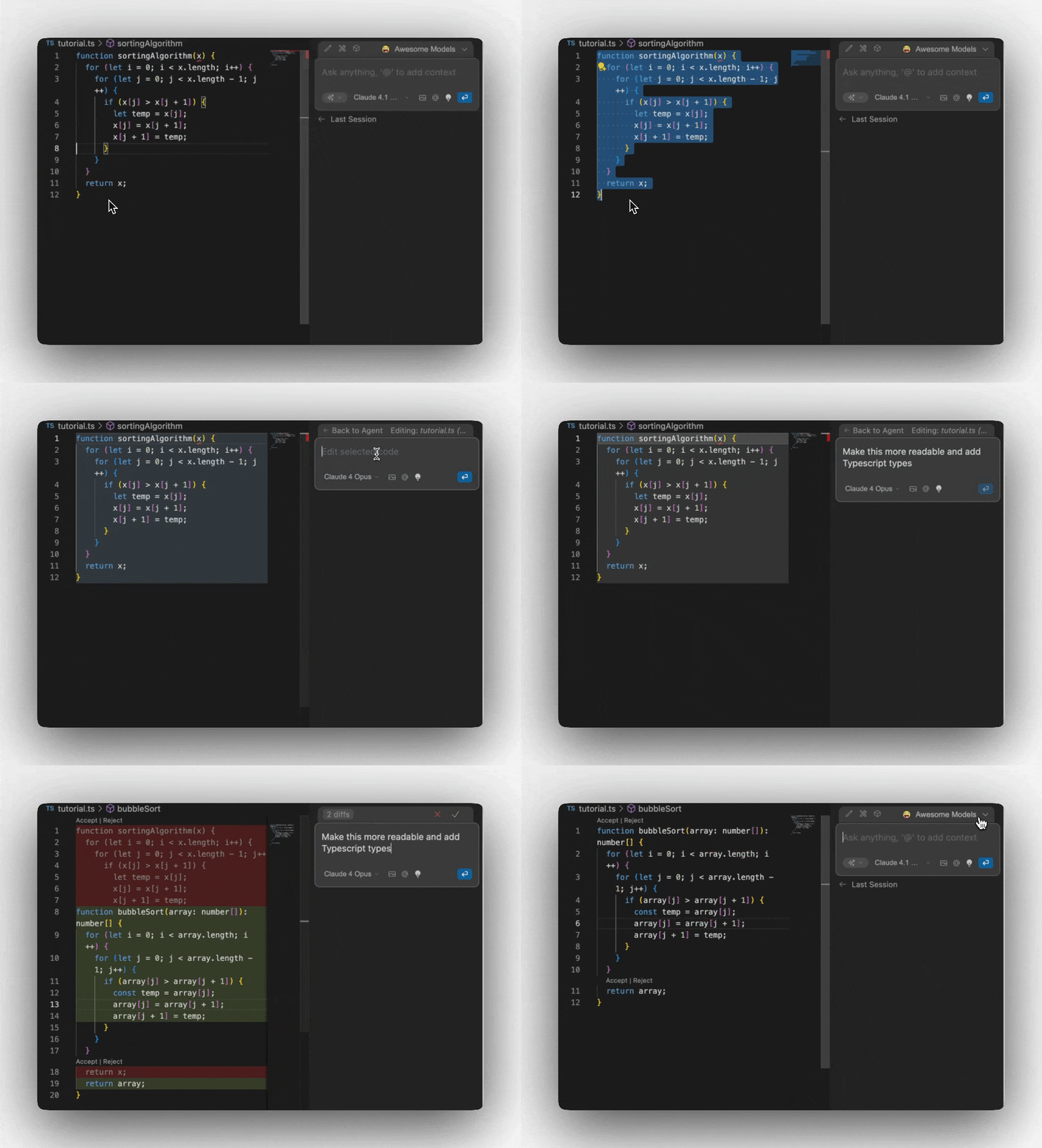
**Highlight** the entire function in your editor
Press **Cmd/Ctrl + I** to open Edit mode
Type: `"make this more readable and add TypeScript types"`
Watch Gobi refactor your code automatically!
Gobi will show you a diff of the proposed changes. Accept or reject individual changes as needed.
Edit is perfect for refactoring, adding documentation, fixing bugs, or
converting between languages/frameworks.
## ✏️ Edit
**What it does**: Make quick, targeted changes to specific code sections using natural language instructions.
Paste this bubble sort implementation in your file:
```javascript theme={null}
function sortingAlgorithm(x) {
for (let i = 0; i < x.length; i++) {
for (let j = 0; j < x.length - 1; j++) {
if (x[j] > x[j + 1]) {
let temp = x[j];
x[j] = x[j + 1];
x[j + 1] = temp;
}
}
}
return x;
}
```
**Highlight** the entire function in your editor
Press **Cmd/Ctrl + I** to open Edit mode
Type: `"make this more readable and add TypeScript types"`
Watch Gobi refactor your code automatically!
Gobi will show you a diff of the proposed changes. Accept or reject individual changes as needed.
Edit is perfect for refactoring, adding documentation, fixing bugs, or
converting between languages/frameworks.
 ## 💬 Chat Mode
**What it does**: Interactive AI assistant that can analyze code, answer questions, and provide guidance without leaving your IDE.
Add this second sorting function to your file:
```javascript theme={null}
function sortingAlgorithm2(x) {
for (let i = 0; i < x.length; i++) {
for (let j = 0; j < x.length - 1; j++) {
if (x[j] > x[j + 1]) {
let temp = x[j];
x[j] = x[j + 1];
x[j + 1] = temp;
}
}
}
return x;
}
```
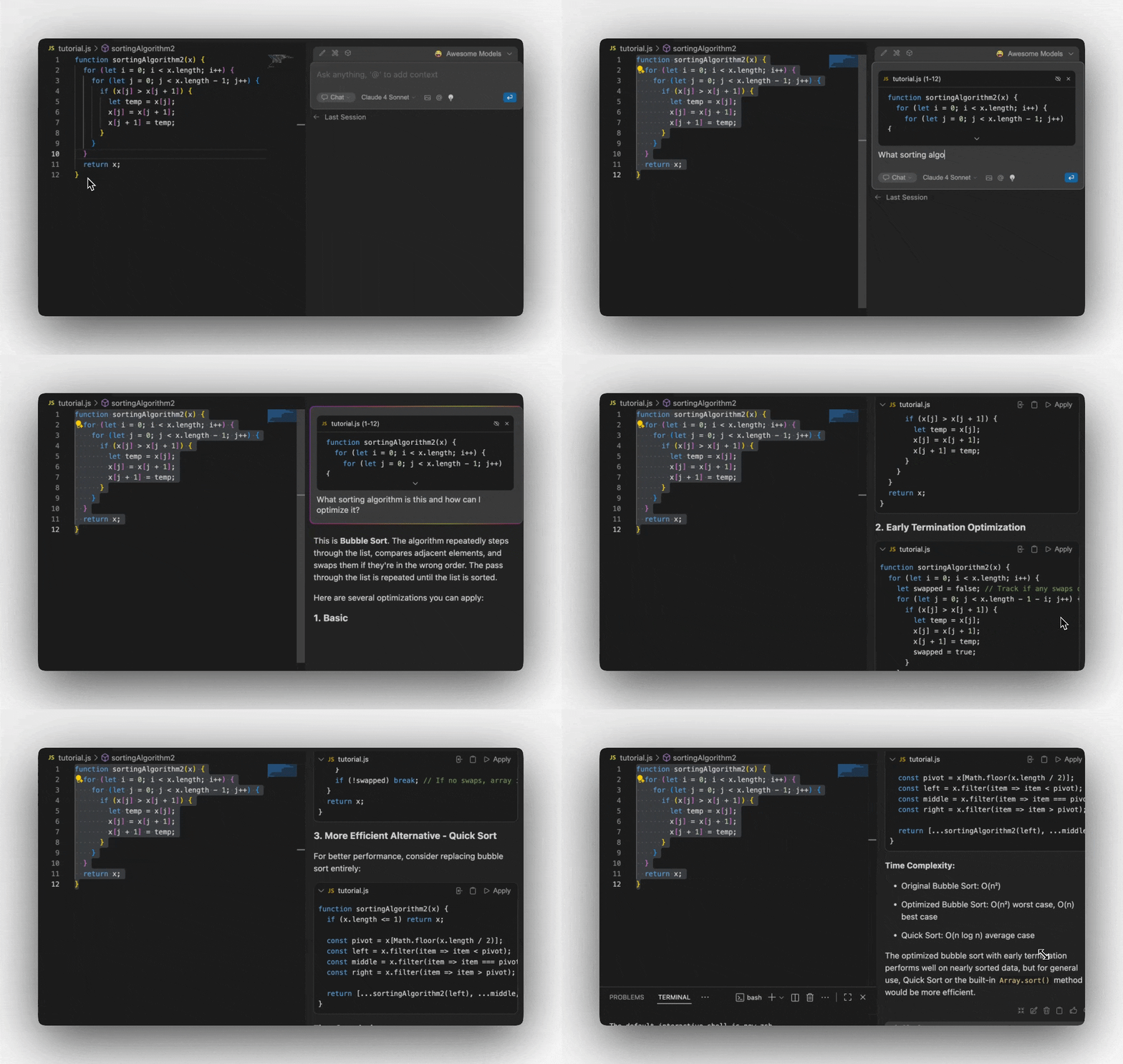
1. **Highlight** the function
2. Use the keyboard shortcuts below to add it to Chat.
3. Ask: `"What sorting algorithm is this and how can I optimize it?"`
Try these follow-up questions:
* `"Show me how to implement quicksort instead"`
* `"What's the time complexity of this algorithm?"`
* `"Can you write unit tests for this function?"`
### Chat Mode Keyboard Shortcuts
**Cmd/Ctrl + L**\
New Chat / New Chat With Selected Code / Close Gobi Sidebar If Chat Already In Focus
**Cmd/Ctrl + Shift + L**\
Focus Current Chat / Add Selected Code To Current Chat / Close Gobi Sidebar If Chat Already In Focus
**Cmd/Ctrl + J**\
New Chat / New Chat With Selected Code / Close Gobi Sidebar If Chat Already In Focus
**Cmd/Ctrl + Shift + J**\
Focus Current Chat / Add Selected Code To Current Chat / Close Gobi Sidebar If Chat Already In Focus
Use Chat for code reviews, debugging help, learning new concepts, or
brainstorming solutions to complex problems.
## 💬 Chat Mode
**What it does**: Interactive AI assistant that can analyze code, answer questions, and provide guidance without leaving your IDE.
Add this second sorting function to your file:
```javascript theme={null}
function sortingAlgorithm2(x) {
for (let i = 0; i < x.length; i++) {
for (let j = 0; j < x.length - 1; j++) {
if (x[j] > x[j + 1]) {
let temp = x[j];
x[j] = x[j + 1];
x[j + 1] = temp;
}
}
}
return x;
}
```
1. **Highlight** the function
2. Use the keyboard shortcuts below to add it to Chat.
3. Ask: `"What sorting algorithm is this and how can I optimize it?"`
Try these follow-up questions:
* `"Show me how to implement quicksort instead"`
* `"What's the time complexity of this algorithm?"`
* `"Can you write unit tests for this function?"`
### Chat Mode Keyboard Shortcuts
**Cmd/Ctrl + L**\
New Chat / New Chat With Selected Code / Close Gobi Sidebar If Chat Already In Focus
**Cmd/Ctrl + Shift + L**\
Focus Current Chat / Add Selected Code To Current Chat / Close Gobi Sidebar If Chat Already In Focus
**Cmd/Ctrl + J**\
New Chat / New Chat With Selected Code / Close Gobi Sidebar If Chat Already In Focus
**Cmd/Ctrl + Shift + J**\
Focus Current Chat / Add Selected Code To Current Chat / Close Gobi Sidebar If Chat Already In Focus
Use Chat for code reviews, debugging help, learning new concepts, or
brainstorming solutions to complex problems.
 ***
## 🤖 Agent Mode
**What it does**: An autonomous coding assistant that can read files, make changes, run commands, and handle complex multi-step tasks.
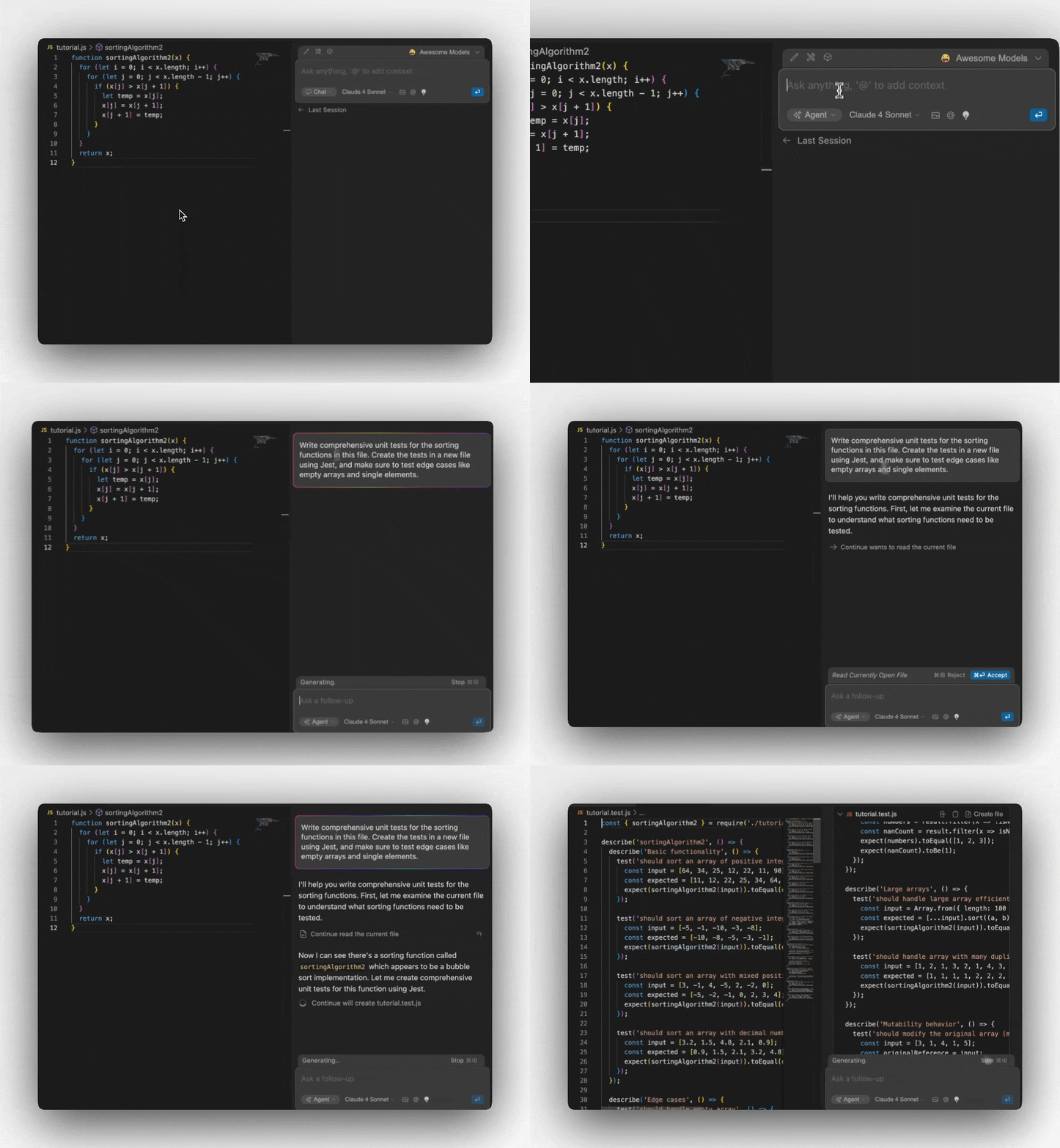
1. Open the Gobi panel
2. Click the **dropdown** in the bottom left of the input box
3. Select **"Agent"** mode
Try this prompt: `"Write comprehensive unit tests for the sorting functions
in this file. Create the tests in a new file using Jest, and make sure to test
edge cases like empty arrays and single elements."`
Agent mode will:
* ✅ Analyze your existing code
* ✅ Create a new test file
* ✅ Write comprehensive tests
* ✅ Handle setup and imports
* ✅ Explain what it's doing at each step
Agent mode has powerful capabilities including file creation and modification.
Always review Agent mode's changes before accepting them.
***
## 🤖 Agent Mode
**What it does**: An autonomous coding assistant that can read files, make changes, run commands, and handle complex multi-step tasks.
1. Open the Gobi panel
2. Click the **dropdown** in the bottom left of the input box
3. Select **"Agent"** mode
Try this prompt: `"Write comprehensive unit tests for the sorting functions
in this file. Create the tests in a new file using Jest, and make sure to test
edge cases like empty arrays and single elements."`
Agent mode will:
* ✅ Analyze your existing code
* ✅ Create a new test file
* ✅ Write comprehensive tests
* ✅ Handle setup and imports
* ✅ Explain what it's doing at each step
Agent mode has powerful capabilities including file creation and modification.
Always review Agent mode's changes before accepting them.
 ***
## Explore More Extension Examples
Ready to explore more? Gobi offers five powerful features to enhance your coding workflow:
[Agent Mode](/ide-extensions/agent/quick-start) equips the Chat model with the tools needed to handle a wide range of coding tasks
***
## Explore More Extension Examples
Ready to explore more? Gobi offers five powerful features to enhance your coding workflow:
[Agent Mode](/ide-extensions/agent/quick-start) equips the Chat model with the tools needed to handle a wide range of coding tasks
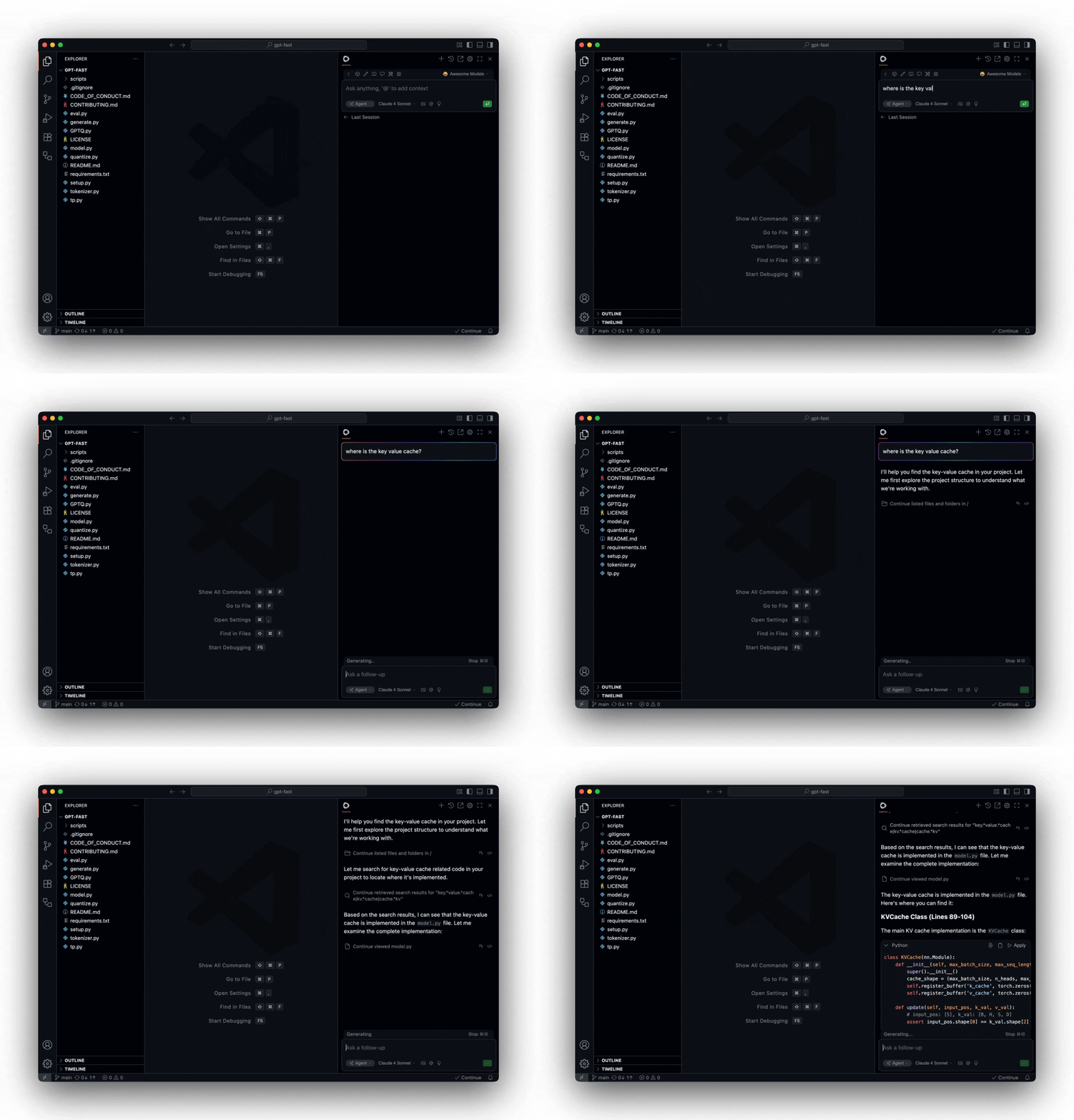 Learn more about [Agent Mode](/ide-extensions/agent/quick-start)
[Chat](/ide-extensions/chat/quick-start) makes it easy to ask for help from an LLM without needing to leave the IDE
Learn more about [Agent Mode](/ide-extensions/agent/quick-start)
[Chat](/ide-extensions/chat/quick-start) makes it easy to ask for help from an LLM without needing to leave the IDE
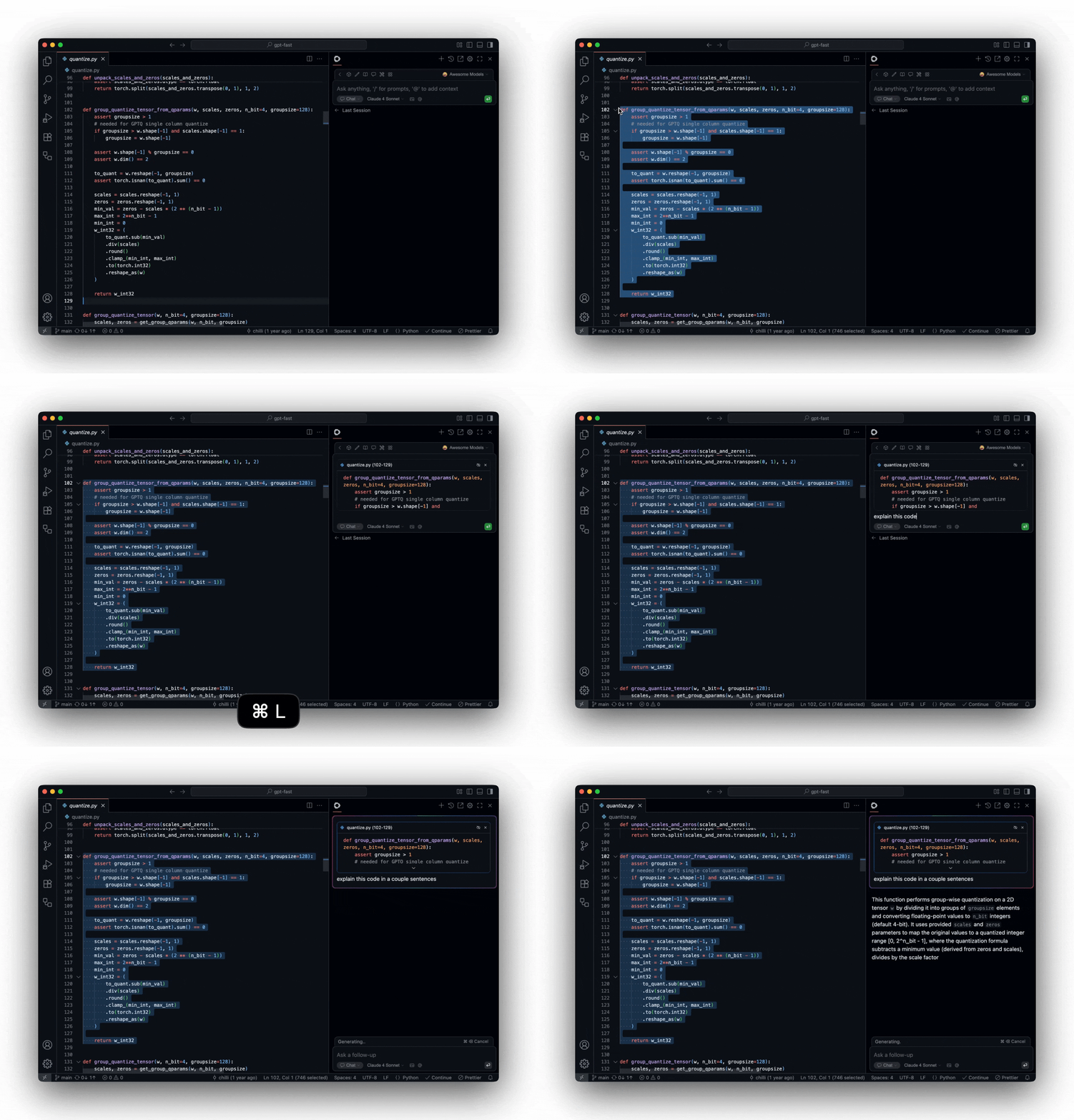 Learn more about [Chat Mode](/ide-extensions/chat/quick-start)
[Plan](/ide-extensions/agent/plan-mode) provides a safe environment with read-only tools for exploring code and planning changes
Learn more about [Chat Mode](/ide-extensions/chat/quick-start)
[Plan](/ide-extensions/agent/plan-mode) provides a safe environment with read-only tools for exploring code and planning changes
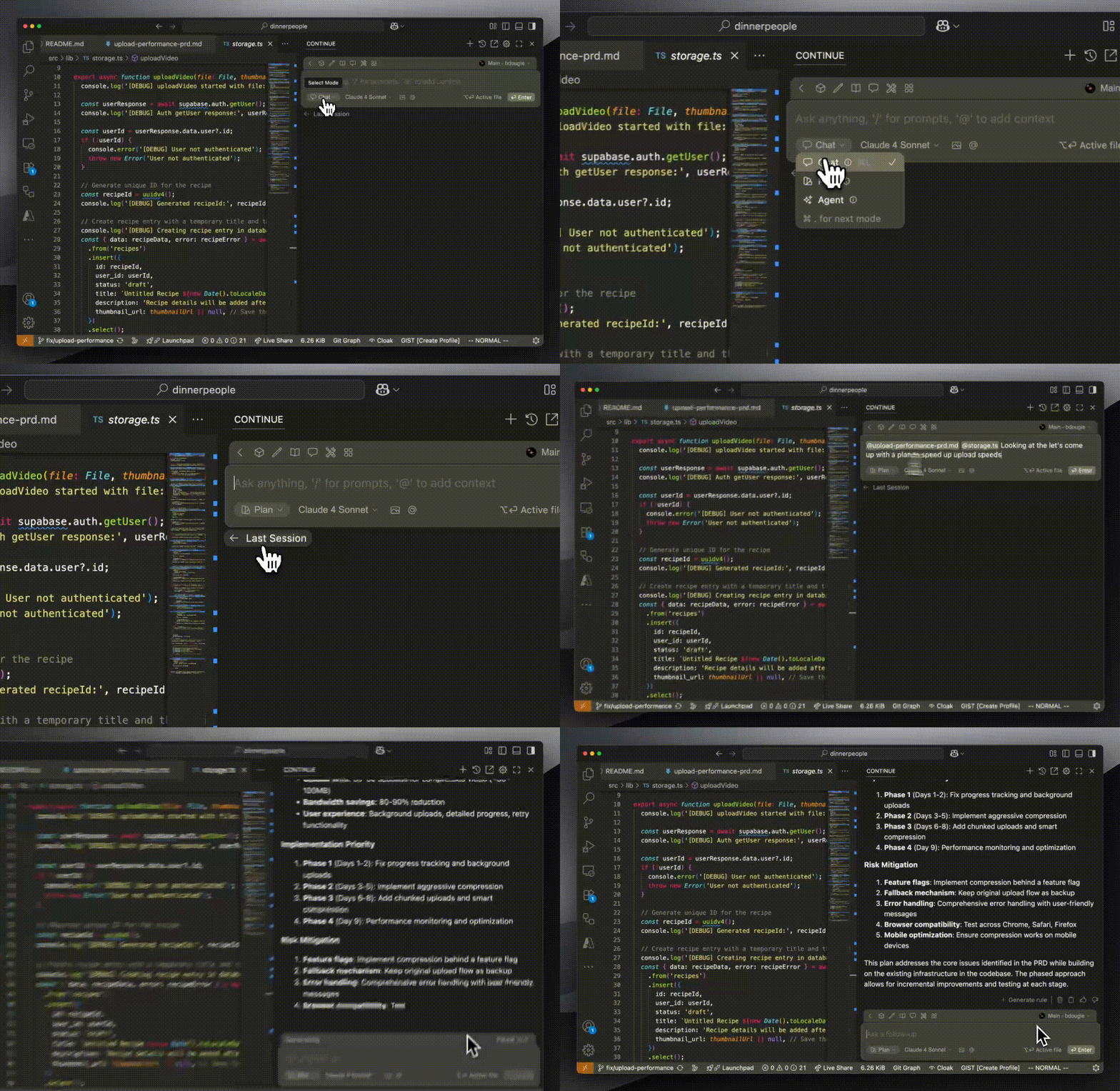 Learn more about [Plan Mode](/ide-extensions/agent/plan-mode)
[Edit](/ide-extensions/edit/quick-start) is a convenient way to modify code without leaving your current file
Learn more about [Plan Mode](/ide-extensions/agent/plan-mode)
[Edit](/ide-extensions/edit/quick-start) is a convenient way to modify code without leaving your current file
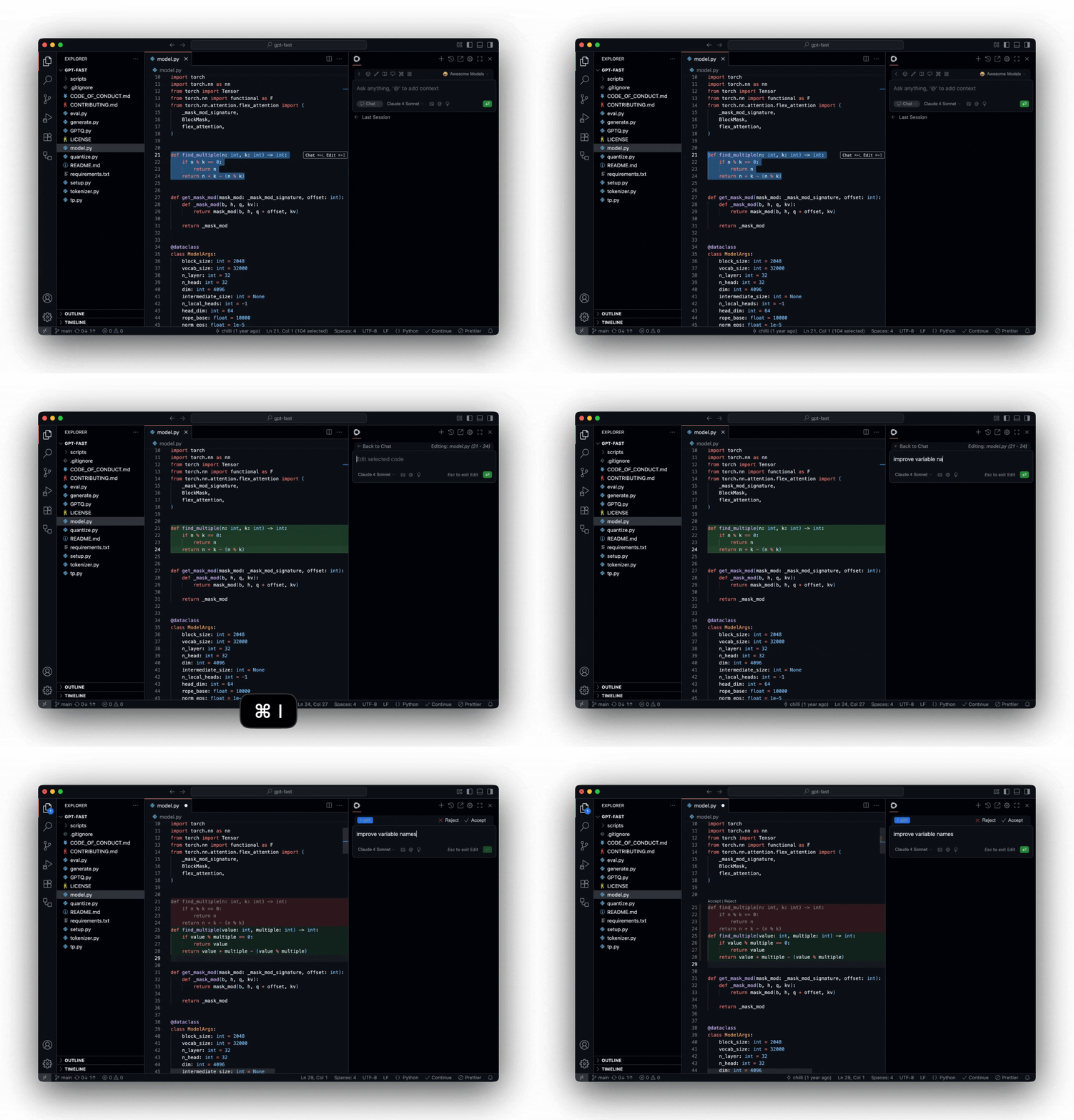 Learn more about [Edit](/ide-extensions/edit/quick-start)
[Autocomplete](/ide-extensions/autocomplete/quick-start) provides inline code suggestions as you type
Learn more about [Edit](/ide-extensions/edit/quick-start)
[Autocomplete](/ide-extensions/autocomplete/quick-start) provides inline code suggestions as you type
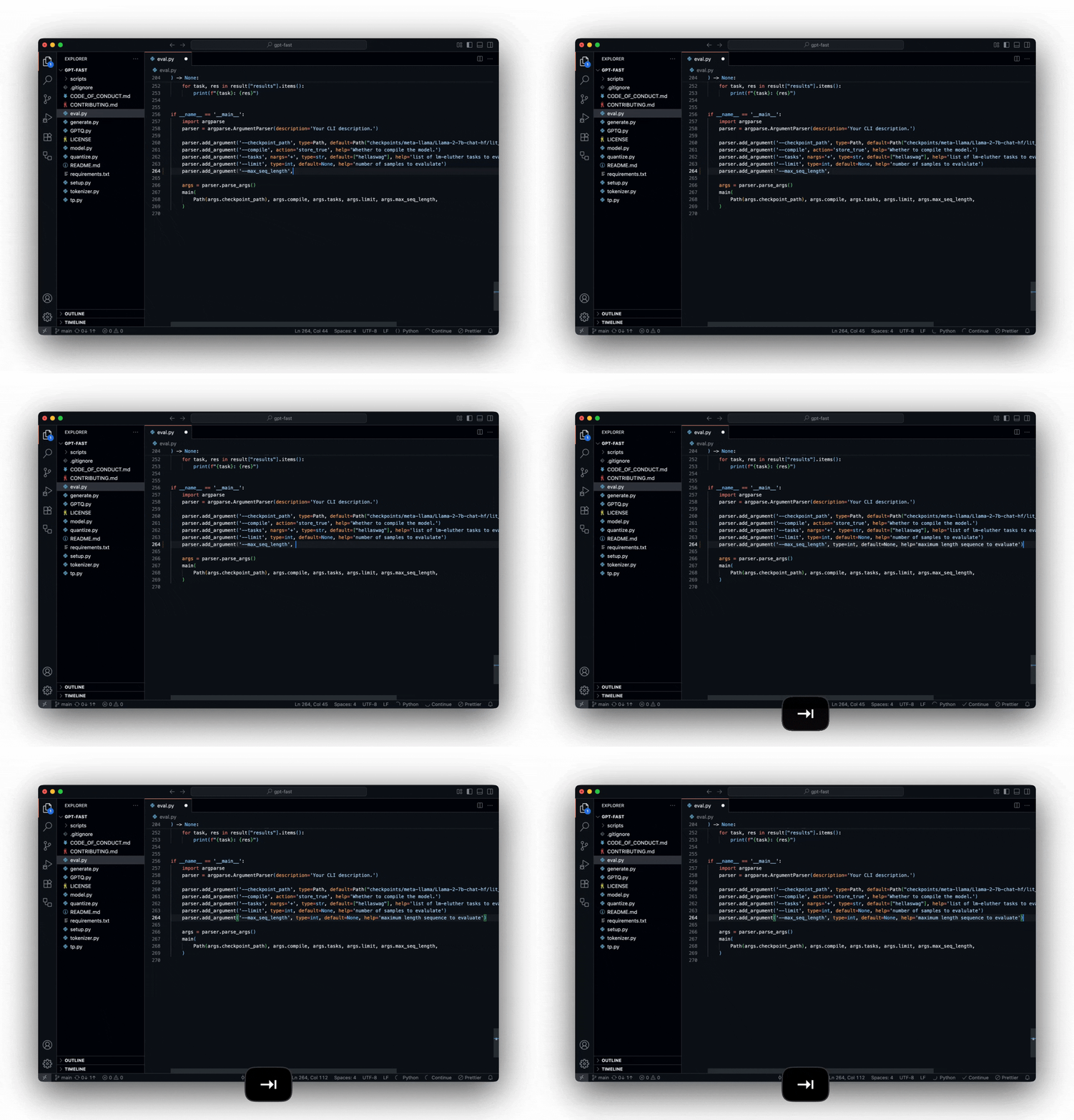 Learn more about [Autocomplete](/ide-extensions/autocomplete/quick-start)
## 🚀 Next Steps
Congratulations! You've experienced all four core Gobi features. Here's what to explore next:
Configure models, add context providers, and personalize your workflow
Dive deeper into Agent mode capabilities and advanced use cases
Connect your preferred AI models and providers
Get help and share experiences with other Gobi users
***
## 📚 Feature Deep Dives
Ready to master specific features? Check out these detailed guides:
Learn about [configuring autocomplete
models](/customize/model-roles/autocomplete), [fine-tuning
suggestions](/customize/deep-dives/autocomplete), and [troubleshooting
common issues](/troubleshooting).
Discover [effective prompting techniques](/customize/deep-dives/prompts), [hub
v. local configuration](/guides/understanding-configs), and [custom slash
commands](/customize/deep-dives/prompts).
Explore [Hub configurations](/hub/configs/intro), [organization
management](/hub/governance/creating-an-org), and [sharing
configurations](/hub/sharing).
**Need help?** Check our [troubleshooting guide](/troubleshooting) or ask a
question in our [community
discussions](https://github.com/gourmand/gobi/discussions).
Learn more about [Autocomplete](/ide-extensions/autocomplete/quick-start)
## 🚀 Next Steps
Congratulations! You've experienced all four core Gobi features. Here's what to explore next:
Configure models, add context providers, and personalize your workflow
Dive deeper into Agent mode capabilities and advanced use cases
Connect your preferred AI models and providers
Get help and share experiences with other Gobi users
***
## 📚 Feature Deep Dives
Ready to master specific features? Check out these detailed guides:
Learn about [configuring autocomplete
models](/customize/model-roles/autocomplete), [fine-tuning
suggestions](/customize/deep-dives/autocomplete), and [troubleshooting
common issues](/troubleshooting).
Discover [effective prompting techniques](/customize/deep-dives/prompts), [hub
v. local configuration](/guides/understanding-configs), and [custom slash
commands](/customize/deep-dives/prompts).
Explore [Hub configurations](/hub/configs/intro), [organization
management](/hub/governance/creating-an-org), and [sharing
configurations](/hub/sharing).
**Need help?** Check our [troubleshooting guide](/troubleshooting) or ask a
question in our [community
discussions](https://github.com/gourmand/gobi/discussions).